
Ace Trace: Create Dynamic Video Highlights with Ease
Overview
Ace Trace is a mobile application designed to simplify the creation of highlight reels by adding dynamic trajectory lines to videos. The software enables users to visualize movement paths of objects such as golf balls, flying discs, or birds through a vibrant, customizable trace line. By eliminating the need for complex desktop editing tools, Ace Trace brings professional-grade video enhancement directly to smartphones. It is ideal for sports enthusiasts, content creators, and casual users who want to enhance their video content with minimal effort.
The app targets individuals who frequently record athletic performances or action-packed moments and wish to emphasize motion and trajectory. Whether capturing a golf drive, a frisbee throw, or a bird in flight, Ace Trace provides intuitive tools to trace movement paths with precision. Its dual interface—dedicated to both golf-specific drives and general free-form tracing—ensures flexibility across different use cases. Real-world applications include sports coaching, social media storytelling, and personal video documentation.
The developer did not provide additional information about the company or background. No specific system requirements were listed beyond platform compatibility. Performance details were not specified.
Key Features & Capabilities
- Automatic Trajectory Tracking – The app uses intelligent algorithms to follow the movement of an object across frames, reducing manual input and ensuring smooth, consistent lines even during camera motion.
- Manual Line Shaping – Users can draw custom paths by hand, allowing for creative freedom when tracing irregular or unpredictable movements.
- Colorful Line Styles – A variety of vibrant line colors and thickness options are available to match user preferences or enhance visual impact.
- Distance Measurement Overlay – Adds real-time distance data to the trace, providing context and increasing the professional appearance of the video.
- Dual Interface Design – Separate modes for golf drive tracing and general free-curve lines ensure optimized workflows tailored to each use case.
- One-Tap Sharing – Completed videos can be exported and shared directly to social media platforms without additional steps.
These features allow users to transform raw footage into engaging, visually compelling content in minutes. For example, a golfer can record a swing with a friend’s phone, apply the trace, add distance, and post the result on Instagram. Similarly, a drone operator could use the free-curve mode to trace the path of a moving vehicle or animal. The integration of automatic tracking and manual editing supports both accuracy and creativity.
User Interface, Workflow & Performance
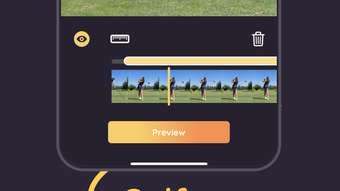
The user interface of Ace Trace is designed for simplicity and speed, focusing on a clean, minimal layout that prioritizes core functions. Navigation is intuitive, with clearly labeled sections for each tracing mode and immediate access to line customization tools. The workflow begins with video selection, followed by trajectory setup—either automatic or manual—then styling and measurement options before export.
Users can expect a responsive experience on supported devices, though exact performance metrics were not provided. The developer did not specify resource usage details, so general behavior patterns suggest efficient operation within standard mobile performance limits. Stability during long video processing was not confirmed, but the app’s mobile-first design implies optimized handling of typical video lengths.
Camera movement does not disrupt the trace line, thanks to internal stabilization logic. This feature enhances usability in real-world conditions where tripods are unavailable. The app’s lightweight nature—120 MB in size—indicates efficient storage use, though actual impact on device performance may vary based on hardware.
Compatibility & System Requirements
Ace Trace is available for both Android and iOS platforms, ensuring broad accessibility across major mobile ecosystems. The current version is 1.2.5, released on April 15, 2024. The installation size is 120 MB, which is modest for a video editing tool with advanced features.
Exact system requirements were not listed by the developer. Compatibility information is limited to the operating systems mentioned. No hardware-specific details such as RAM, CPU, or GPU requirements were provided. Users should ensure their device meets general standards for running modern mobile applications. Performance may vary depending on device age, background processes, and video resolution.
Pros and Cons
Pros
- Simple, intuitive interface ideal for non-professionals
- Automatic tracking reduces manual effort and improves accuracy
- Supports both sports-specific and general-purpose tracing
- Offers distance measurement for enhanced video context
- Small file size (120 MB) for efficient storage use
- Free to download and use with no hidden costs
Cons
- No information on system requirements or device compatibility thresholds
- Performance under heavy video loads not documented
- Limited to mobile platforms—no desktop version available
- Exact resource usage (CPU, RAM) not disclosed
- Offline functionality not confirmed
FAQ Section
Is Ace Trace available for both Android and iOS?
Yes, Ace Trace is compatible with both Android and iOS devices, allowing users on major mobile platforms to access its features.
Can I use Ace Trace without a tripod?
Yes, the app is designed to maintain trace lines even when the camera moves. This makes it ideal for recording with a friend’s phone or handheld devices.
Does Ace Trace require an internet connection?
The app functions offline after installation. However, updates may require an internet connection. No cloud storage or online processing was confirmed.
Is Ace Trace free to use?
Yes, Ace Trace is available at no cost. There are no in-app purchases or subscription fees mentioned in the provided information.
Can I share my traced videos directly from the app?
Yes, the app includes one-tap sharing functionality, allowing users to export and post their enhanced videos directly to social media platforms.
Final Thoughts + CTA
Ace Trace delivers a focused, user-friendly solution for creating dynamic video highlights with minimal effort. Its ability to track motion paths and add visual context through colorful lines makes it a standout tool for sports content creators and casual users alike. The dual interface supports both specialized and general use cases, while the free pricing model enhances accessibility.
While detailed system information and performance data are not available, the app’s mobile-first design and compact size suggest efficient operation on modern smartphones. It excels in real-world scenarios where quick, high-impact video edits are needed.
For anyone looking to elevate their video storytelling—especially in sports or action-based content—Ace Trace offers a powerful yet simple way to stand out. Download Ace Trace now and take your videos to the next level.







